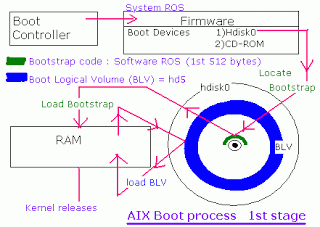
- After POST, the firmware (System Read Only Storage) detects the 1st bootable device stored in the bootlist. (here it is hdisk0)
- then the bootstrap code (software ROS) i.e. 1st 512 bytes of the hard disk loads to RAM.
- Bootstrap code locates the Boot Logical Volume (BLV = hd5) from the harddisk
- BLV contains AIX kernel, rc.boot Script, Reduced ODM and Boot commands.
- Then BLV in the RAM uncompresses and Kernel releases from it.
- Then AIX Kernel gets control.
- AIX Kernel creates a RAM File System (Rootvg not activated now).
- kernel starts init process from the BLV.
- init executes rc.boot script from the BLV in the RAM.
- Init with rc.boot 1 configures base devices.
rc.boot 1 in detail
- init process from RAMFS executes rc.boot 1 (if any error LED=c06)
- restbase command copies ODM from BLV to RAMFS.(success LED=510, error LED=548)
- cfgmgr -f calls Config_rules ( which are phase=1) and activates all base devices.
- run command bootinfo -b to check last boot device ( success LED=511).
Then
- rc.boot 2 activates rootvg from hard disk.
rc.boot 2 in detail
- rc.boot 2 (LED 551)
- ipl_varyon to activate rootvg ( success LED= 517, error LED=552,554,556).
- run command fsck -f /dev/hd4 to check whether “/” unmounted uncleanely in the last shutdown ( error LED=555).
- mount /dev/hd4 (/) to RAMFS (error LED=557 due to corrupted jfslog..)
- fsck -f /dev/hd2 i.e. “/usr” ( error LED=518).
- mount /dev/hd2 in RAMFS.
- fsck -f /dev/hd9var i.e. check “/var“
- mount /var
- copycore command checks whether dump occured. then copy dump from primary dump device paging space (/dev/hd6) to /var/adm/ras/.
- unmount /var
- swapon /dev/hd6 i.e. activate primary paging space.
Now the condition is /dev/hd4 is mounted on / in the RAMFS;
cfgmgr -f configured all base devices . so configuration data has been written to ODM of RAMFS.
- mergedev is called and copy /dev from RAMFS to disk.
- copy customized ODM from RAMFS to hard disk(at this stage both ODM from hd5 and hd4 are sync now)
- mount /var.
- Boot messages copy to file on the hard disk ( /var/adm/ras/bootlog) alog -t boot -o to view bootlog
Now / , /usr and /var are mounted in rootvg on the hard disk. Then
- Kernel removes RAMFS
- init process start from / in the rootvg
Here completes rc.boot 2, Now the condition is kernel removed RAMFS and accessing rootvg filesystems from hard disk. init from BLV replaced by init from hard disk
- in rc.boot 3, init process /etc/inittab file and remaining devices are configured.
rc.boot 3 in detail
- /etc/init starts and reads /etc/inittab ( LED=553)
- runs /sbin/rc.boot 3
- fsck -f /dev/hd3 i.e. check /tmp.
- mount /tmp
- sysncvg rootvg &; i.e. run syncvg in background and report stale PPs.
- cfgmgr -P2 i.e. run cfgmgr in phase 2 in normal startup. (cfgmgr -P3 in service mode)
- All remaining devices are configured now.
- cfgcon configures console ( LED= c31 select console, c32 lft, c33 tty, c34 file on disk). If CDE mentioned in /etc/inittab we will get graphical console.
- savebase calls to sync ODM from BLV with / FS (i.e. /etc/objrepos).
- syncd daemon started. All data from cache memory to disk saves in every 60 seconds.
- starts errdaemon for error logging.
- LED display turned OFF.
- rm /etc/nologin i.e. if the file is not removed, then login is not possible.
- If any device are in missed state, (in Cudv chgstatus=3) display it.
- Display “system initialization completed“
Then execute next line from /etc/inittab
Boot process of AIX in detail
I. The boot process in AIX
As a system administrator you should have a general understanding of the boot process. This knowledge is useful to solve problems that can prevent a system from booting properly. These problems can be both software or hardware.We also recommend that you be familiar with the hardware configuration of your system.
Booting involves the following steps:
The initial step in booting a system is named Power On Self Test (POST). Its purpose is to verify that basic hardware is in functional state.The memory, keyboard, communication and audio devices are also initialized. You can see an image for each of these devices displayed on the screen. It is during this step that you can press a function key to choose a different boot list. The LED values displayed during this phase are model specific. Both hardware and software problems can prevent the system from booting.
System Read Only Storage (ROS) is specific to each system type. It is necessary for AIX 5L Version 5.3 to boot, but it does not build the data structures required for booting. It will locate and load bootstrap code. System ROS contains generic boot information and is operating system independent. Software ROS (also named bootstrap) forms an IPL control block which is compatible with AIX 5L Version 5.3, takes control and builds AIX 5L
specific boot information. A special file system located in memory and named RAMFS file system is created. Software ROS then locates, loads, and turns control over to AIX 5L Boot Logical Volume (BLV). Software ROS is AIX 5L information created based on machine type and is responsible for completing machine preparation to enable it to start AIX 5L kernel. A complete list of files that are part of the BLV can be obtained from directory /usr/lib/boot.
The most important components are the following:
– The AIX 5L kernel
– Boot commands called during the boot process such as bootinfo, cfgmgr
– A reduced version of the ODM. Many devices need to be configured hd4 (/) made available, so their corresponding methods have to be stored in the BLV. These devices are marked as base in PdDv.
– The rc.boot script
Note: Old systems based on MCI architecture execute an additional step before this, the so called Built In Self Test (BIST). This step is no longer required for systems based on PCI architecture.
The AIX 5L kernel is loaded and takes control. The system will display 0299 on the LED panel. All previous codes are hardware-related. The kernel will complete the boot process by configuring devices and starting the init process. LED codes displayed during this stage will be generic AIX 5L codes. So far, the system has tested the hardware, found a BLV, created the RAMFS, and started the init process from the BLV. The rootvg has not yet been activated. From now on the rc.boot script will be called three times, each timebeing passed a different parameter.
1.Boot phase 1
During this phase, the following steps are taken:
The init process started from RAMFS executes the boot script rc.boot
If init process fails for some reason, code c06 is shown on LED display. At this stage, the restbase command is called to copy a partial image of ODM from the BLV into the RAMFS. If this operation is successful LED display shows 510, otherwise LED code 548 is shown.
After this, the cfgmgr -f command reads the Config_Rules class from the reduced ODM. In this class, devices with the attribute phase=1 are considered base devices. Base devices are all devices that are necessary to access rootvg.
For example, if the rootvg is located on a hard disk all devices starting from motherboard up to the disk will have to be initialized.The corresponding methods are called so that rootvg can be activated in the nextboot phase 2. At the end of boot phase 1, the bootinfo -b command is called to determine the last boot device. At this stage, the LED shows 511.
2.Boot phase 2
In this phase , the rc.boot script is passed to the parameter 2. During this phase the following steps are taken.
a) The rootvg volume group is varied on with the special version of the varyonvg command ipl_varyon. If this command is successful the system displays 517. otherwise one of the following LED will appear 552,554,556 and the boot process is halted.
b) Root file system hd4 is checked using the fsck -f command. This will verify only whether the filesystem was unmounted cleanly before the last shutdown. If this command fails, the system will display code 555.
c) The root file system ( /dev/hd4 ) is mounted on a temporary mount point /mnt in RAMFS. If this fails 557 will appear in LED.
d) The /usr file system is verified using fsck -f command and then mounted. the copycore command checks if a dump occured. if it did, it is copied from default dump devices, /dev/hd6 to the default copy directory /var/adm/ras. After this /var is unmounted.
e) The primary pagingspace from rootvg, /dev/hd6 will be activated.
f) The mergedev process is called and /dev files from RAMFS are copied to disk.
g) All customized ODM files from the RAMFS are copied to disk.Both ODM versions from hd4 and hd5 are synchronized.
h) Finaly, the root file system from rootvg (disk) is mounted over the root file system from the RAMFS. The mount points for the root filesystems become available. now the /var and /usr file systems from the rootvg are mounted again on their ordinary mount points. There is no console available at this stage; so all boot messages will be copied to alog. The alog command maintains and manages logs.
3.Boot Phase 3
After phase 2 is completed rootvg is activated and the following steps are taken,
a. /etc/init process is started. It reads /etc/inittab file and calls rc.boot with argument 3
b. The /tmp filesystem is mounted.
c. The rootvg is synchronized by calling the synchvg command and launching it as background process. As a result all stale partitions from rootvg are updated.At this stage LED code 553 is shown.
d. At this stage the cfgmgr command is called.if the system is booted in normal mode the cfgmgr command is called with option -p2; in service mode, option -p3. The cfgmgr command reads the Config_rules files from ODM and calls all methods corresponding to either phase 2 or 3. All other devices that are not base devices are configured at this time.
e. Next the console is configured by calling the cfgcon command. After the configuration of the console , boot messages are send to the console if no STDOUT redirection is made. However all missed messages can be found in /var/adm/ras/conslog. LED codes that can be displayed at this time are :
c31 = console not yet configured.
c32 = console is an LFT terminal.
c33 = console is a TTY.
c34 = console is a file on the disk.
f. finally the synchronization of the ODM in the BLV with the ODM from the / (root) filesyatem is done by the savebase command.
g. The syncd daemon and errdaemon are started.
h. LED display is turned off.
i. if the /etc/nologin exists, it will be removed.
j. If there are devices marked as missing in CuDv a message is displayed on the console.
i. the message system initialization completed is send to the console. the execution of the rc.boot has completed. init process will continue processing the next command from /etc/inittab.
II. system initialization
During system startup, after the root file system has been mounted in the pre-initialization process, the following sequence of events occurs:
1. The init command is run as the last step of the startup process.
2. The init command attempts to read the /etc/inittab file.
3. If the /etc/inittab file exists, the init command attempts to locate an initdefauult entry in the /etc/inittab file.
a. If the initdefault entry exists, the init command uses the specified runlevel as the initial system run level.
b. If the initdefault entry does not exist, the init command requests that the user enter a run level from the system console (/dev/console).
c. If the user enters an S, s, M, or m run level, the init command enters the maintenance run level. These are the only runlevels that do not require a properly formatted /etc/inittab file.
4. If the /etc/inittab file does not exist, the init command places the system in the maintenance run level by default.
5. The init command rereads the /etc/inittab file every 60 seconds. If the /etc/inittab file has changed since the last time the init command read it, the new commands in the /etc/inittab file are executed.
III. The /etc/inittab file
The /etc/inittab file controls the initialization process.
The /etc/inittab file supplies the script to the init command’s role as a general process dispatcher. The process that constitutes the majority of the init command’s process dispatching activities is the /etc/getty line process, which initiates individual terminal lines. Other processes typically dispatched by the init command are daemons and the shell.
The /etc/inittab file is composed of entries that are position-dependent and have the following format,
/etc/inittab format = Identifier:RunLevel:Action:Command
Each entry is delimited by a newline character. A backslash (\) preceding a new line character indicated the continuation of an entry. There are no limits (other than maximum entry size) on the number of entries in the /etc/inittab file.
The maximum entry size is 1024 characters.
The entry fields are :
Identifier
A one to fourteen character field that uniquely identifies an object.
RunLevel
The run level at which this entry can be processed. The run level has the following attributes:
-Run levels effectively correspond to a configuration of processes in the system.
-Each process started by the init command is assigned one or more run levels in which it can exist.
-Run levels are represented by the numbers 0 through 9.
Eg: if the system is in run level 1, only those entries with a 1 in the run-level field are started.
-When you request the init command to change run levels, all processes without a matching entry in the run-level field for the target run level receive a warning signal (SIGTERM). There is a 20-second grace period before processes are forcibly terminated by the kill signal (SIGKILL).
-The run-level field can define multiple run levels for a process by selecting more than one run level in any combination from 0 through 9. If no run level is specified, the process is assumed to be valid at all run levels.
-There are four other values that appear in the run-level field, even though they are not true run levels: a, b, c and h. Entries that have these characters in the run level field are processed only when the telinit command requests them to be run (regardless of the current run level of the system). They differ from run levels in that the init command can never enter run level a, b, c or h. Also, a request for the execution of any of these processes does not change the current run level. Furthermore, a process started by an a, b, or c command is not killed when the init command changes levels. They are only killed if their line in the /etc/inittab file is marked off in the action field, their line is deleted entirely from /etc/inittab, or the init command goes into single-user mode.
Action
It tells the init command how to treat the process specified in the process field. The following actions are recognized by the init command:
respawn If the process does not exist, start the process. Do not wait for its termination (continue scanning the /etc/inittab file). Restart the process when it dies. If the process exists, do nothing and continue scanning the /etc/inittab file.
wait When the init command enters the run level that matches the entry’s run level, start the process and wait for its termination. All subsequent reads of the /etc/inittab file, while the init command is in the same run level, will cause the init command to ignore this entry.
once When the init command enters a run level that matches the entry’s run level, start the process, and do not wait for termination. When it dies, do not restart the process. When the system enters a new run level, and the process is still running from a previous run level change, the program will not be restarted.
boot Process the entry only during system boot, which is when the init command reads the /etc/inittab file during system startup. Start the process, do not wait for its termination, and when it dies, do not restart the process. In order for the instruction to be meaningful, the run level should be the default or it must match the init command’s run level at boot time. This action is useful for an initialization function following a hardware reboot of the system.
bootwait Process the entry the first time that the init command goes from single-user to multi-user state after the system is booted. Start the process, wait for its termination, and when it dies, do not restart the process. If the initdefault is 2, run the process right after boot.
powerfail Execute the process associated with this entry only when the init command receives a power fail signal ( SIGPWR).
powerwait Execute the process associated with this entry only when the init command receives a power fail signal (SIGPWR), and wait until it terminates before continuing to process the /etc/inittab file.
off If the process associated with this entry is currently running, send the warning signal (SIGTERM), and wait 20 seconds before terminating the process with the kill signal (SIGKILL). If the process is not running, ignore this entry.
ondemand Functionally identical to respawn, except this action applies to the a, b, or c values, not to run levels.
initdefault An entry with this action is only scanned when the init command is initially invoked. The init command uses this entry, if it exists, to determine which run level to enter initially. It does this by taking the highest run level specified in the run-level field and using that as its initial state. If the run level field is empty, this is interpreted as 0123456789. therefore, the init command enters run level 9. Additionally, if the init command does not find an initdefault entry in the /etc/inittab file, it requests an initial run level from the user at boot time.
sysinit Entries of this type are executed before the init command tries to access the console before login. It is expected that this entry will only be used to initialize devices on which the init command might try to ask the run level question. These entries are executed and waited for before continuing.
Command
A shell command to execute. The entire command field is prefixed with exec and passed to a forked sh as sh -c exec command. Any legal sh command syntax can appear in this field. Comments can be inserted with the # comment syntax.
The getty command writes over the output of any commands that appear before it it in the /etc/inittab file. To record the output of these commands to the boot log, pipe their output to the alog -tboot command. The stdin, stdout, and stderr file descriptors may not be available while the init command is processing inittab entries. Any entries writing to stdout or stderr may not work predictably unless they redirect their output to a file or to /dev/console.
The following commands are the only supported methods for modifying the records in the /etc/inittab file.
lsitab Lists records in the /etc/inittab file.
mkitab Adds records to the /etc/inittab file.
chitab Changes records in the /etc/inittab file.
rmitab Removes records from the /etc/inittab file.
Eg:
If you want to add a record on the /etc/inittab file to run the find command on the run level 2 and start it again once it has finished:
1. Run the ps command and display only those processes that contain the word find:
# ps -ef | grep find
root 19750 13964 0 10:47:23 pts/0 0:00 grep find
#
2. Add a record named xcmd on the /etc/inittab using the mkitab command:
# mkitab “xcmd:2:respawn:find / -type f > /dev/null 2>&1”
3. Show the new record with the lsitab command:
# lsitab xcmd
xcmd:2:respawn:find / -type f > /dev/null 2>&1
#
4. Display the processes:
# ps -ef | grep find
root 25462 1 6 10:56:58 – 0:00 find / -type f
root 28002 13964 0 10:57:00 pts/0 0:00 grep find
#
5. Cancel the find command process:
# kill 25462
6. Display the processes:
# ps -ef | grep find
root 23538 13964 0 10:58:24 pts/0 0:00 grep find
root 28966 1 4 10:58:21 – 0:00 find / -type f
#
Since the action field is configured as respawn, a new process (28966 in this example) is started each time its predecessor finishes. The process will continue re-spawning, unless you change the action field,
Eg:
1. Change the action field on the record xcmd from respawn to once:
# chitab “xcmd:2:once:find / -type f > /dev/null 2>&1”
2. Display the processes:
# ps -ef | grep find
root 20378 13964 0 11:07:20 pts/0 0:00 grep find
root 28970 1 4 11:05:46 – 0:03 find / -type f
3. Cancel the find command process:
# kill 28970
4. Display the processes:
# ps -ef | grep find
root 28972 13964 0 11:07:33 pts/0 0:00 grep find
#
To delete this record from the /etc/inittab file, you use the rmitab command.
Eg:
# rmitab xcmd
# lsitab xcmd
#
Order of the /etc/inittab entries
The base process entries in the /etc/inittab file is ordered as follows:
1. initdefault
2. sysinit
3. Powerfailure Detection (powerfail)
4. Multiuser check (rc)
5. /etc/firstboot (fbcheck)
6. System Resource Controller (srcmstr)
7. Start TCP/IP daemons (rctcpip)
8. Start NFS daemons (rcnfs)
9. cron
10.pb cleanup (piobe)
11.getty for the console (cons)
The System Resource Controller (SRC) has to be started near the begining of the etc/inittab file since the SRC daemon is needed to start other processes. Since NFS requires TCP/IP daemons to run correctly, TCP/IP daemons are started ahead of the NFS daemons. The entries in the /etc/inittab file are ordered according to dependencies, meaning that if a process (process2) requires that another process (process1) be present for it to operate normally, then an entry for process1 comes before an entry for process2 in the /etc/inittab file.